总结
headless- 大量的官方 demo/extensions
novel,在线 Demo 地址- block-editor
why tiptap?
tiptap 解决我的问题,概念清晰,有很多 demo,extension,能让我快速完成开发工作,基于 tiptap 实现了一款类似notion的编辑器,block-editor 架构
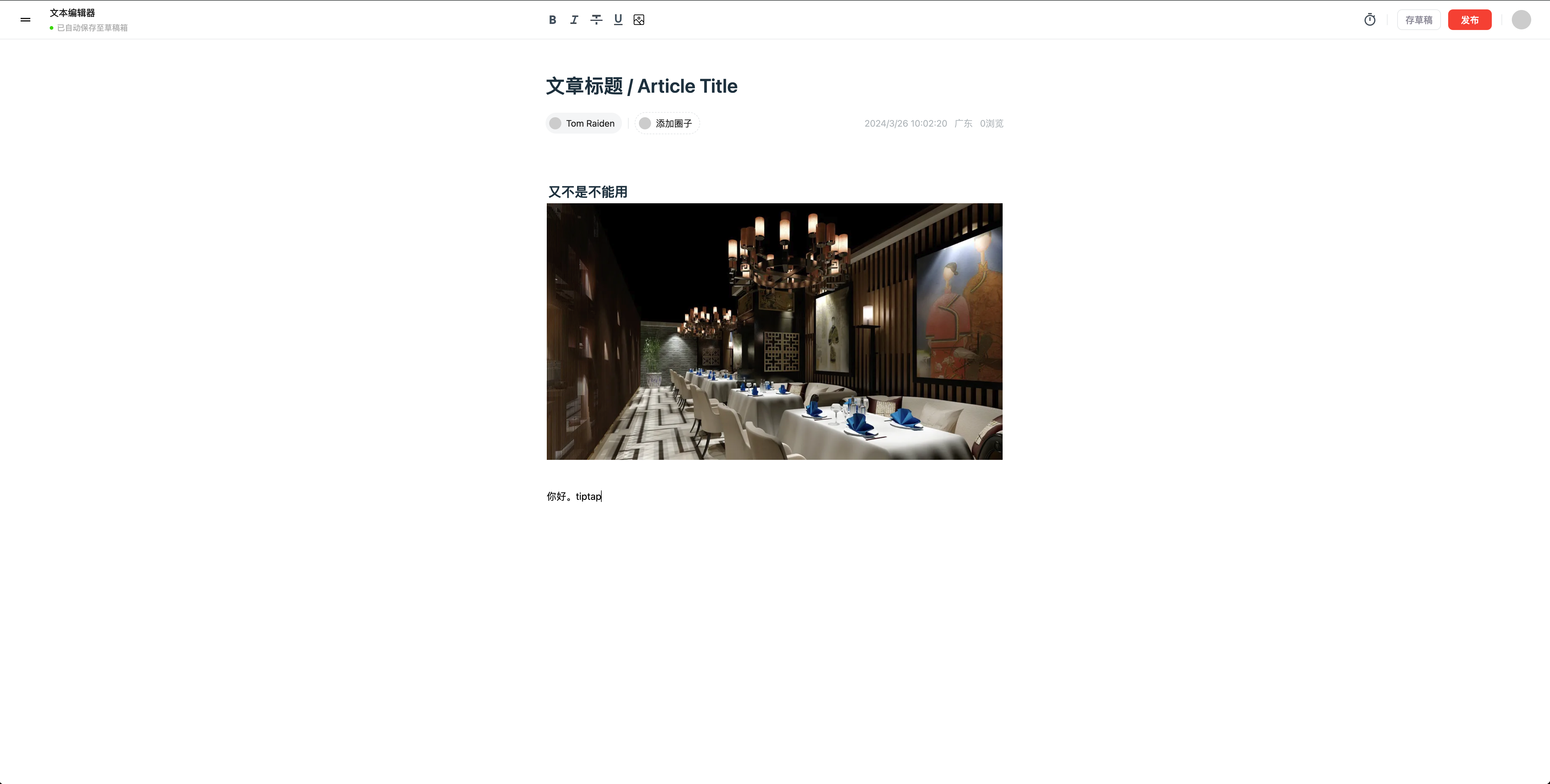
headless
tiptap 支持自由控制页面样式,它自己本身没有样式只提供逻辑,比如自定义类


通过配置插件 @tiptap/starter-kit HTMLAttributes,别的插件同理
js
import StarterKit from '@tiptap/starter-kit'

export const defaultExtensions = [
  StarterKit.configure({
    blockquote: {
      HTMLAttributes: {
        class: 'border-l-4 border-stone-700'
      }
    },
    bold: {
      HTMLAttributes: {
        class: 'font-bold'
      }
    }
  })
]
import StarterKit from '@tiptap/starter-kit'
export const defaultExtensions = [
StarterKit.configure({
blockquote: {
HTMLAttributes: {
class: 'border-l-4 border-stone-700'
}
},
bold: {
HTMLAttributes: {
class: 'font-bold'
}
}
})
]生态成熟
有很多开箱即用的拓展,可以减少大量开发时间:https://tiptap.dev/docs/editor/extensions
它还有个
StarterKit入门套件,把常用拓展封装到一起,这样我们使用的时候节省了很多代码,也可以去修改这些拓展
js
import { Editor } from '@tiptap/core'
import StarterKit from '@tiptap/starter-kit'

const editor = new Editor({
  content: '<p>Example Text</p>',
  extensions: [
    StarterKit.configure({
      history: false, //协同的时候需要禁用history
      heading: {
        levels: [1, 2]
      }
    })
  ]
})
import { Editor } from '@tiptap/core'
import StarterKit from '@tiptap/starter-kit'
const editor = new Editor({
content: '<p>Example Text</p>',
extensions: [
StarterKit.configure({
history: false, //协同的时候需要禁用history
heading: {
levels: [1, 2]
}
})
]
})- 另外它属于商业开源库,有自己的公司和团队,有些
pro插件和它的云看板需要收费。这些收费功能也可以自己开发。这种开源项目和WangEditor个人项目不同,会持续维护。
使用已有插件
比如一个分割线插件,只需要很少的步骤就可使用,可以在 examples 找到大部分功能
下载和配置
js
import HorizontalRule from './horizontalRule'

const editor = useEditor({
  extensions: [HorizontalRule],
  content: '<p>Hello World! </p>',
  // 可以传入编辑器里
  editorProps: {
    attributes: {
      class:
        'prose dark:prose-invert prose-sm sm:prose-base lg:prose-lg xl:prose-2xl m-5 focus:outline-none'
    }
  }
})
import HorizontalRule from './horizontalRule'
const editor = useEditor({
extensions: [HorizontalRule],
content: '<p>Hello World! </p>',
// 可以传入编辑器里
editorProps: {
attributes: {
class:
'prose dark:prose-invert prose-sm sm:prose-base lg:prose-lg xl:prose-2xl m-5 focus:outline-none'
}
}
})使用
js
<button onClick={() => editor.chain().focus().setHorizontalRule().run()}>
  horizontal rule
</button><button onClick={() => editor.chain().focus().setHorizontalRule().run()}>
horizontal rule
</button>js
editor 是一个 Tiptap 实例;
chain() 用于告诉编辑器要执行多个命令;
focus() 将焦点设置回编辑器,(这样用户编辑的光标就不会中断);
setHorizontalRule() 指定对应插件功能;
run() 执行。
editor 是一个 Tiptap 实例;
chain() 用于告诉编辑器要执行多个命令;
focus() 将焦点设置回编辑器,(这样用户编辑的光标就不会中断);
setHorizontalRule() 指定对应插件功能;
run() 执行。还能记住是否已经触发过某种状态
js
className={editor.isActive('bold') ? 'is-active' : ''}className={editor.isActive('bold') ? 'is-active' : ''}自定义插件
写一个自定义的插件,可以参考 https://tiptap.dev/docs/editor/guide/custom-extensions
read-only
所见即所得,也可以自己写渲染代码
js
import { EditorContent, useEditor } from '@tiptap/react'
import StarterKit from '@tiptap/starter-kit'
import React, { useEffect, useState } from 'react'

export default () => {
  const [editable, setEditable] = useState(false)
  const editor = useEditor({
    editable,
    content: `
        <p>
          This text is <strong>read-only</strong>. No matter what you try, you are not able to edit something. Okay, if you toggle the checkbox above you’ll be able to edit the text.
        </p>
        <p>
          If you want to check the state, you can call <code>editor.isEditable()</code>.
        </p>
      `,
    extensions: [StarterKit]
  })

  useEffect(() => {
    if (!editor) {
      return undefined
    }

    editor.setEditable(editable)
  }, [editor, editable])

  if (!editor) {
    return null
  }

  return (
    <>
      <div className="checkbox">
        <input
          type="checkbox"
          id="editable"
          value={editable}
          onChange={(event) => setEditable(event.target.checked)}
        />
        <label htmlFor="editable">editable</label>
      </div>
      <EditorContent editor={editor} />
    </>
  )
}
import { EditorContent, useEditor } from '@tiptap/react'
import StarterKit from '@tiptap/starter-kit'
import React, { useEffect, useState } from 'react'
export default () => {
const [editable, setEditable] = useState(false)
const editor = useEditor({
editable,
content: `
<p>
This text is <strong>read-only</strong>. No matter what you try, you are not able to edit something. Okay, if you toggle the checkbox above you’ll be able to edit the text.
</p>
<p>
If you want to check the state, you can call <code>editor.isEditable()</code>.
</p>
`,
extensions: [StarterKit]
})
useEffect(() => {
if (!editor) {
return undefined
}
editor.setEditable(editable)
}, [editor, editable])
if (!editor) {
return null
}
return (
<>
<div className="checkbox">
<input
type="checkbox"
id="editable"
value={editable}
onChange={(event) => setEditable(event.target.checked)}
/>
<label htmlFor="editable">editable</label>
</div>
<EditorContent editor={editor} />
</>
)
}获取编辑器数据
js
editor.getJSON().contenteditor.getJSON().content监听编辑器变化
可以自动保存草稿
js
const CustomExtension = Extension.create({
  onCreate() {
    // The editor is ready.
  },
  onUpdate() {
    // The content has changed.
  },
  onSelectionUpdate({ editor }) {
    // The selection has changed.
  },
  onTransaction({ transaction }) {
    // The editor state has changed.
  },
  onFocus({ event }) {
    // The editor is focused.
  },
  onBlur({ event }) {
    // The editor isn t focused anymore.
  },
  onDestroy() {
    // The editor is being destroyed.
  }
})
const CustomExtension = Extension.create({
onCreate() {
// The editor is ready.
},
onUpdate() {
// The content has changed.
},
onSelectionUpdate({ editor }) {
// The selection has changed.
},
onTransaction({ transaction }) {
// The editor state has changed.
},
onFocus({ event }) {
// The editor is focused.
},
onBlur({ event }) {
// The editor isn t focused anymore.
},
onDestroy() {
// The editor is being destroyed.
}
})或者
js
editor.on('update', () => {
  // 字数实时统计
  const wordCount = editor.getText().length
})editor.on('update', () => {
// 字数实时统计
const wordCount = editor.getText().length
})nodes、marks
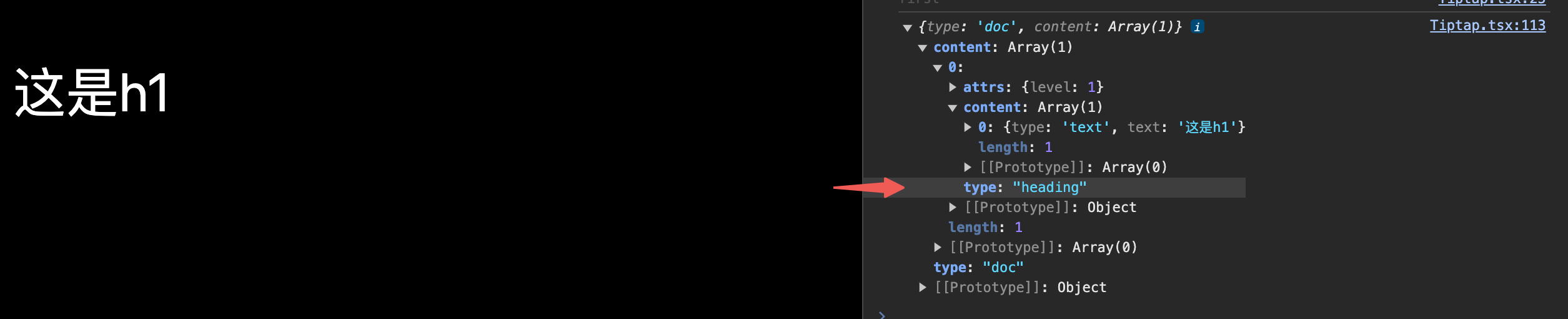
nodes:节点大部分是块级元素,如 h1,不同的 JSON 的 type 字段,文本是"paragraph",h1 是"heading"(attrs:level:),可以套娃
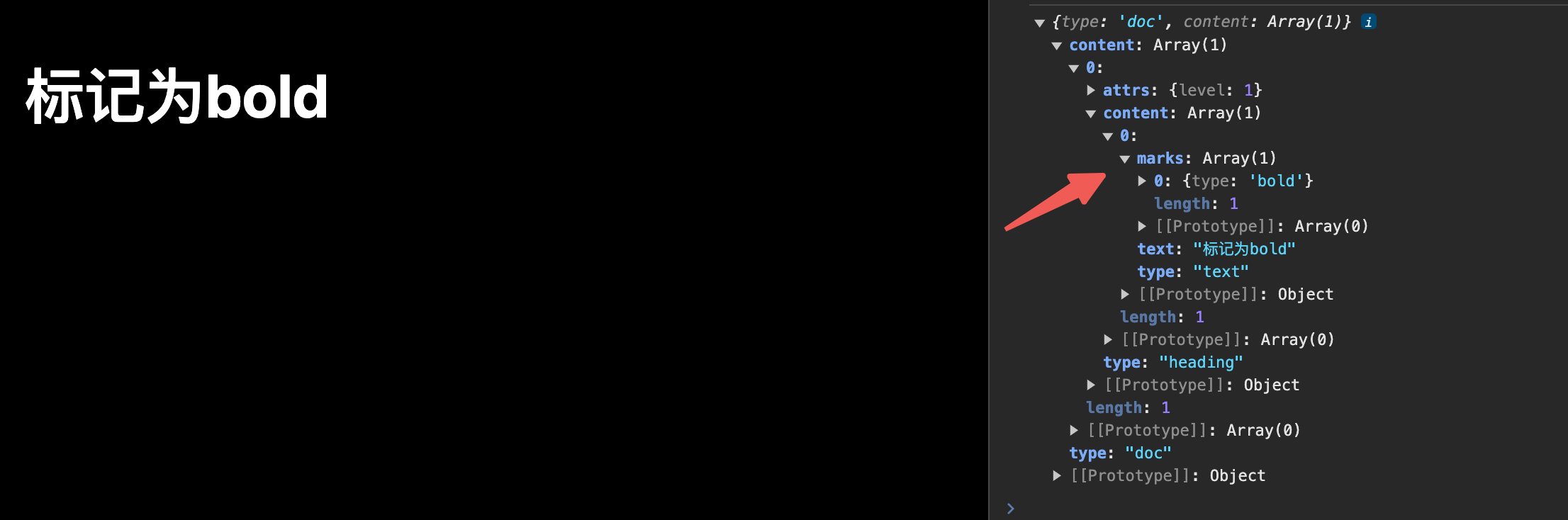
marks:可以将一个或多个标记应用于节点,例如添加粗体和斜体等内联格式或其他附加信息。就是一个标记,和 type 同级的,像 props,在 content > marks 里标记
可参考资料
一些思考
- 从复用性/性能/开发体验(易上手)/健壮性(规范且可维护)/可拓展性来看,tiptap 都是很好的选择
tiptap插件使用清晰,插件开箱即用,能减少大量开发时间- 它想法很好,它有个入门套件,叫,可以通过
starterKit一个插件就能把常用功能覆盖掉,而且也支持修改这些常用功能,减少了很大一部分代码 - 封装的一些方法和拓展,符合函数式编程思想,比如操作按钮支持
bold功能,可以去看它的example,或者去看它拓展插件,可以快速实现该功能,而且仅仅是函数调用的方式(清晰优雅) - 一些细节也到位,比如
focus,不阻止用户输入,自定义样式headless,自定义输出等,协同也支持,不过用不上