前言
参考:
官网文档:custom-extensions
官方开源编辑器:tiptap template
社区开源编辑器:novel
文中只包含核心配置,插件开发有很多细节和 api,可以在开发中学习
md
Node 参考 Paragraph 、 Heading、 CodeBlock 或 horizontal-rule 源码,Mark 参考 Bold 、 Italic 和 Highlight 源码。
我们写的插件(投票报名商品卡片)更贴近 Node 的 horizontal-rule
官网的文档写得不清晰,只有多试和看源码
Node 参考 Paragraph 、 Heading、 CodeBlock 或 horizontal-rule 源码,Mark 参考 Bold 、 Italic 和 Highlight 源码。
我们写的插件(投票报名商品卡片)更贴近 Node 的 horizontal-rule
官网的文档写得不清晰,只有多试和看源码总览
核心有这六个配置
Node 和 Mark
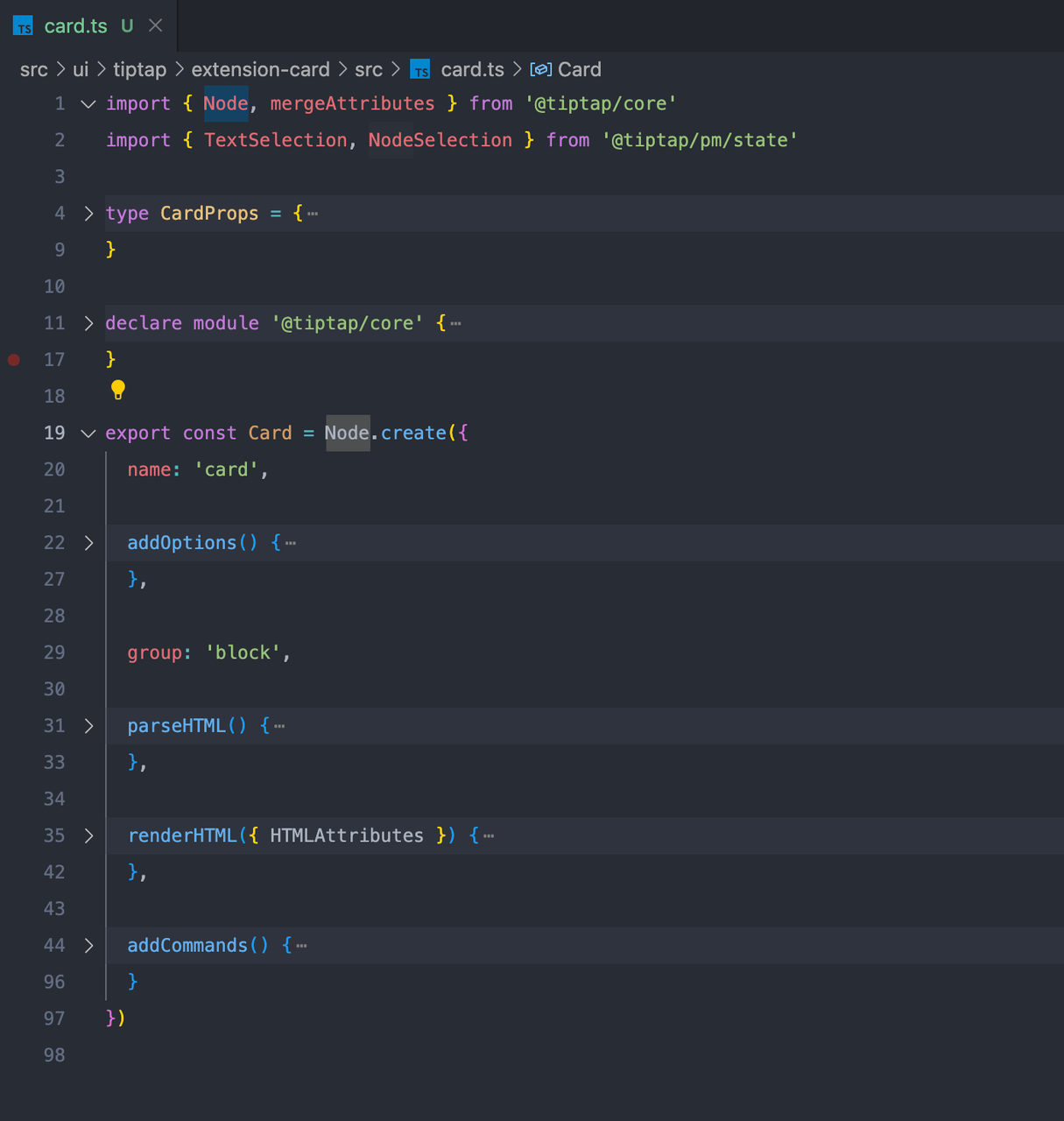
Mark可以应用于节点,例如内联格式Node是一种内容类型,例如标题或段落 可以看到这个插件是Node.create创建的,对应的是Mark可以理解为Node对应的是块级节点,Mark对应行内节点(当然不一定,但是这样好理解)
name
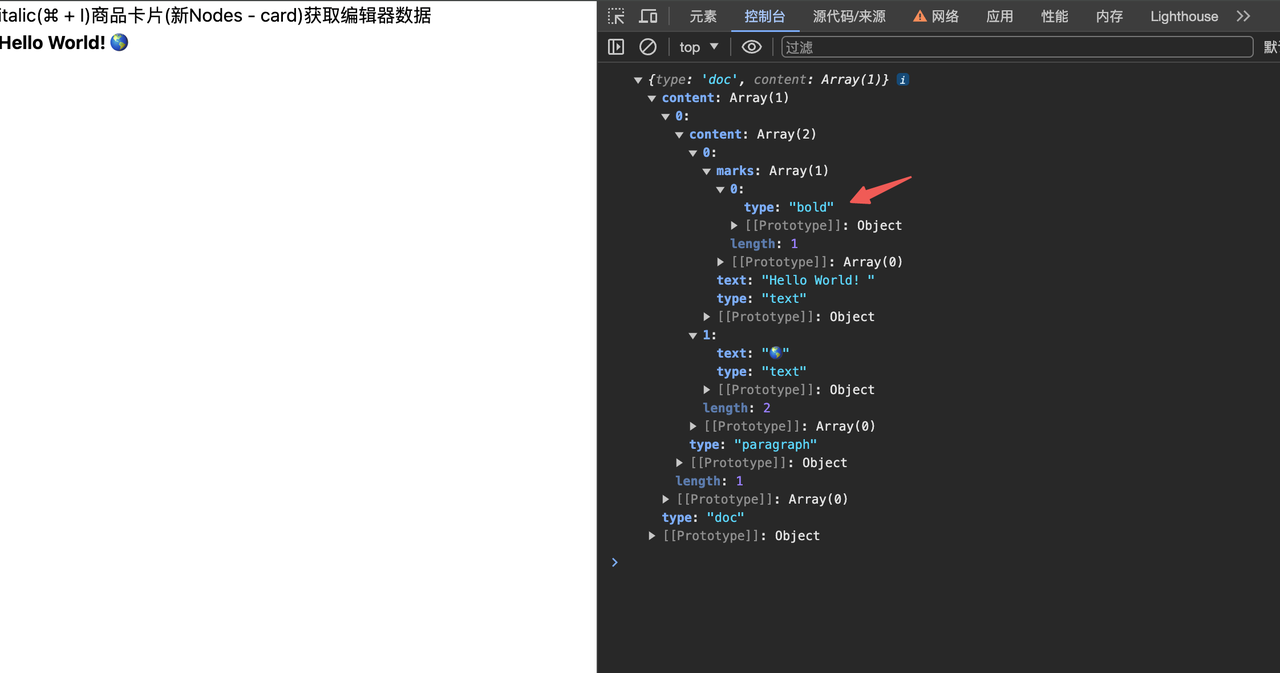
第一个name是一个标识,也就是 type,如下获取数据的时候
addOptions
保存数据的地方,后面可以用 this.options.xxx 来注入数据,获取数据,像 vue 的data 注入数据:比如要依赖输入的 title 来显示插件,通常在 renderHTML 的时候 获取数据:通常在 addCommands 的时候
js
  addOptions() {
    return {
      HTMLAttributes: {},
      cardData: {}
    }
} addOptions() {
return {
HTMLAttributes: {},
cardData: {}
}
}还能通过插件配置的时候传入数据
js
Card.configure({
HTMLAttributes: {
class: 'w-[708px] h-[40px] border border-[#ff4132]'
}
})Card.configure({
HTMLAttributes: {
class: 'w-[708px] h-[40px] border border-[#ff4132]'
}
})group
group: 'block'指定为块级元素,Node 模块一定要加,否则会不显示
parseHTML
要解析的 DOM,也就是遇到 div 就尝试解析为我们定义的插件
js
parseHTML() {
return [{ tag: 'div' }]
} parseHTML() {
return [{ tag: 'div' }]
}renderHTML
与parseHTML对应,是要渲染的内容,是树型结构,第一个参数是类型,第二个参数是props,第三个参数为children
js
renderHTML({ HTMLAttributes }) {
const { title } = this.options.cardData
return [
'div',
mergeAttributes(this.options.HTMLAttributes, HTMLAttributes),
['div', { class: 'text-[16px] font-bold text-[#ff4132]' }, title]
]
} renderHTML({ HTMLAttributes }) {
const { title } = this.options.cardData
return [
'div',
mergeAttributes(this.options.HTMLAttributes, HTMLAttributes),
['div', { class: 'text-[16px] font-bold text-[#ff4132]' }, title]
]
}addCommands
Command 命令,在编辑器内执行一个操作,以某种方式改变状态,返回的对象是暴露出去用的函数,并且函数的返回值是做链式调用
js
addCommands() {
return {
setCard:
(props: CardProps) =>
({ chain, state }) => {
this.options.cardData = props
const currentChain = chain() // 创建一个新的命令链
const { $to: $originTo } = state.selection
// 检查光标是否在文档的开头
if ($originTo.parentOffset === 0) {
// 如果是,将分割线插入到文档开头的前两个位置
currentChain.insertContentAt(Math.max($originTo.pos - 2, 0), {
type: this.name
})
} else {
// 如果不是,在光标处插入分割线
currentChain.insertContent({
type: this.name
})
}
return currentChain
.command(({ tr, dispatch }) => {
if (dispatch) {
const { $to } = tr.selection
const posAfter = $to.end()
if ($to.nodeAfter) {
if ($to.nodeAfter.isTextblock) {
tr.setSelection(TextSelection.create(tr.doc, $to.pos + 1))
} else if ($to.nodeAfter.isBlock) {
tr.setSelection(NodeSelection.create(tr.doc, $to.pos))
} else {
tr.setSelection(TextSelection.create(tr.doc, $to.pos))
}
} else {
const node = $to.parent.type.contentMatch.defaultType?.create()
if (node) {
tr.insert(posAfter, node)
tr.setSelection(TextSelection.create(tr.doc, posAfter))
}
}
tr.scrollIntoView()
}
return true
})
.run()
}
}
}addCommands() {
return {
setCard:
(props: CardProps) =>
({ chain, state }) => {
this.options.cardData = props
const currentChain = chain() // 创建一个新的命令链
const { $to: $originTo } = state.selection
// 检查光标是否在文档的开头
if ($originTo.parentOffset === 0) {
// 如果是,将分割线插入到文档开头的前两个位置
currentChain.insertContentAt(Math.max($originTo.pos - 2, 0), {
type: this.name
})
} else {
// 如果不是,在光标处插入分割线
currentChain.insertContent({
type: this.name
})
}
return currentChain
.command(({ tr, dispatch }) => {
if (dispatch) {
const { $to } = tr.selection
const posAfter = $to.end()
if ($to.nodeAfter) {
if ($to.nodeAfter.isTextblock) {
tr.setSelection(TextSelection.create(tr.doc, $to.pos + 1))
} else if ($to.nodeAfter.isBlock) {
tr.setSelection(NodeSelection.create(tr.doc, $to.pos))
} else {
tr.setSelection(TextSelection.create(tr.doc, $to.pos))
}
} else {
const node = $to.parent.type.contentMatch.defaultType?.create()
if (node) {
tr.insert(posAfter, node)
tr.setSelection(TextSelection.create(tr.doc, posAfter))
}
}
tr.scrollIntoView()
}
return true
})
.run()
}
}
}自定义一个卡片插件
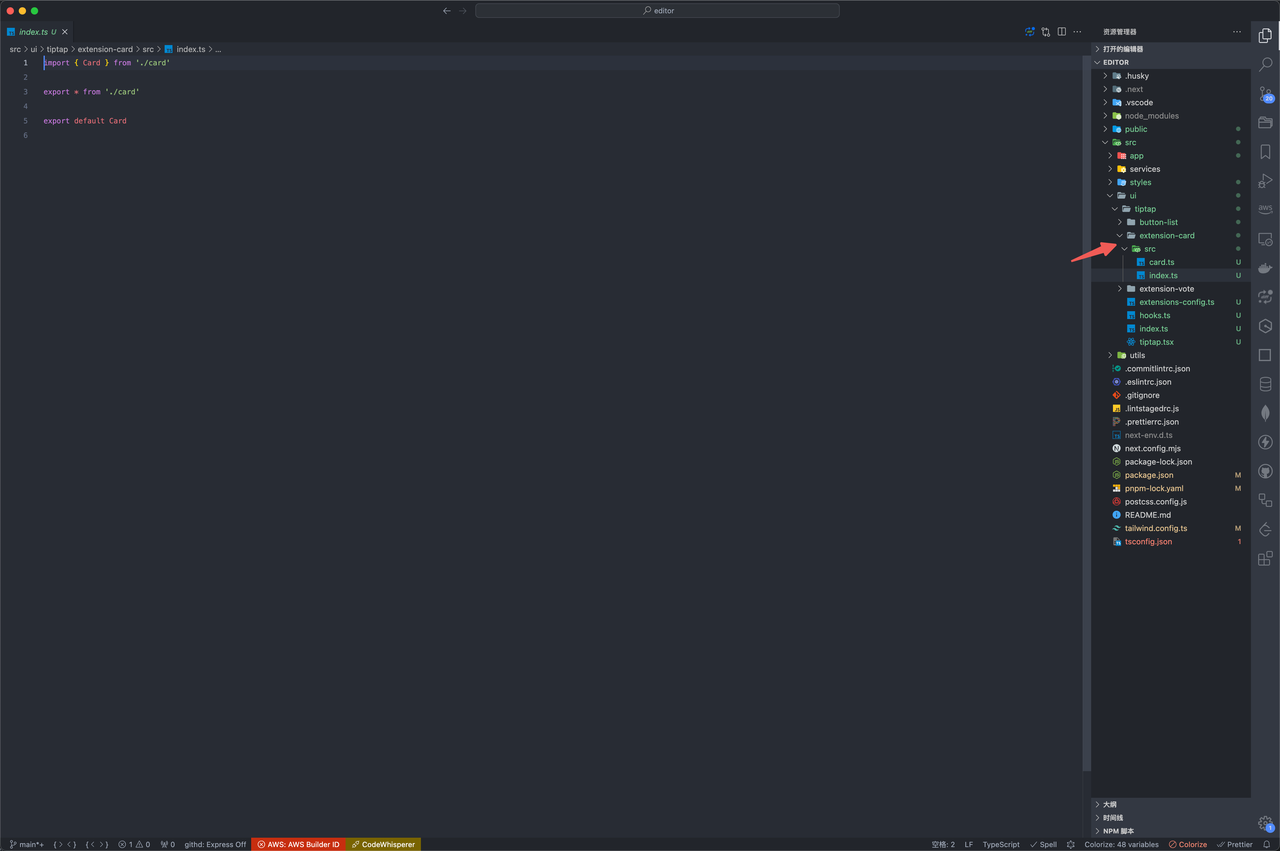
在之前的基础上要下载这个包:pnpm i @tiptap/core,参考官方插件,使用这样的目录,这样的好处是后续稳定后能单独发布插件来复用
card.ts
js
import { Node, mergeAttributes } from '@tiptap/core'
import { TextSelection, NodeSelection } from '@tiptap/pm/state'
type CardProps = {
title: string
subTitle: string
price: string
img: string
}
declare module '@tiptap/core' {
interface Commands<ReturnType> {
card: {
setCard: (props: CardProps) => ReturnType
}
}
}
export const Card = Node.create({
name: 'card',
  addOptions() {
    return {
      HTMLAttributes: {},
      cardData: {}
    }
},
group: 'block',
parseHTML() {
return [{ tag: 'div' }]
},
renderHTML({ HTMLAttributes }) {
const { title } = this.options.cardData
return [
'div',
mergeAttributes(this.options.HTMLAttributes, HTMLAttributes),
['div', { class: 'text-[16px] font-bold text-[#ff4132]' }, title]
]
},
addCommands() {
return {
setCard:
(props: CardProps) =>
({ chain, state }) => {
this.options.cardData = props
const currentChain = chain()
const { $to: $originTo } = state.selection
if ($originTo.parentOffset === 0) {
currentChain.insertContentAt(Math.max($originTo.pos - 2, 0), {
type: this.name
})
} else {
currentChain.insertContent({
type: this.name
})
}
return currentChain
.command(({ tr, dispatch }) => {
if (dispatch) {
const { $to } = tr.selection
const posAfter = $to.end()
if ($to.nodeAfter) {
if ($to.nodeAfter.isTextblock) {
tr.setSelection(TextSelection.create(tr.doc, $to.pos + 1))
} else if ($to.nodeAfter.isBlock) {
tr.setSelection(NodeSelection.create(tr.doc, $to.pos))
} else {
tr.setSelection(TextSelection.create(tr.doc, $to.pos))
}
} else {
const node = $to.parent.type.contentMatch.defaultType?.create()
if (node) {
tr.insert(posAfter, node)
tr.setSelection(TextSelection.create(tr.doc, posAfter))
}
}
tr.scrollIntoView()
}
return true
})
.run()
}
}
}
})import { Node, mergeAttributes } from '@tiptap/core'
import { TextSelection, NodeSelection } from '@tiptap/pm/state'
type CardProps = {
title: string
subTitle: string
price: string
img: string
}
declare module '@tiptap/core' {
interface Commands<ReturnType> {
card: {
setCard: (props: CardProps) => ReturnType
}
}
}
export const Card = Node.create({
name: 'card',
addOptions() {
return {
HTMLAttributes: {},
cardData: {}
}
},
group: 'block',
parseHTML() {
return [{ tag: 'div' }]
},
renderHTML({ HTMLAttributes }) {
const { title } = this.options.cardData
return [
'div',
mergeAttributes(this.options.HTMLAttributes, HTMLAttributes),
['div', { class: 'text-[16px] font-bold text-[#ff4132]' }, title]
]
},
addCommands() {
return {
setCard:
(props: CardProps) =>
({ chain, state }) => {
this.options.cardData = props
const currentChain = chain()
const { $to: $originTo } = state.selection
if ($originTo.parentOffset === 0) {
currentChain.insertContentAt(Math.max($originTo.pos - 2, 0), {
type: this.name
})
} else {
currentChain.insertContent({
type: this.name
})
}
return currentChain
.command(({ tr, dispatch }) => {
if (dispatch) {
const { $to } = tr.selection
const posAfter = $to.end()
if ($to.nodeAfter) {
if ($to.nodeAfter.isTextblock) {
tr.setSelection(TextSelection.create(tr.doc, $to.pos + 1))
} else if ($to.nodeAfter.isBlock) {
tr.setSelection(NodeSelection.create(tr.doc, $to.pos))
} else {
tr.setSelection(TextSelection.create(tr.doc, $to.pos))
}
} else {
const node = $to.parent.type.contentMatch.defaultType?.create()
if (node) {
tr.insert(posAfter, node)
tr.setSelection(TextSelection.create(tr.doc, posAfter))
}
}
tr.scrollIntoView()
}
return true
})
.run()
}
}
}
})extensions
注入插件
js
import StarterKit from '@tiptap/starter-kit'
import Card from './extension-card/src'
export const extensionsConfig = [
StarterKit.configure({
blockquote: {
HTMLAttributes: {
class: 'border-l-4 border-stone-700'
}
},
bold: {
HTMLAttributes: {
class: 'font-bold'
}
},
heading: {
levels: [1, 2, 3]
},
horizontalRule: {
HTMLAttributes: {
class: 'my-[20px]'
}
}
}),
Card.configure({
  HTMLAttributes: {
    class: 'w-[708px] h-[40px] border border-[#ff4132]'
  }
})
]import StarterKit from '@tiptap/starter-kit'
import Card from './extension-card/src'
export const extensionsConfig = [
StarterKit.configure({
blockquote: {
HTMLAttributes: {
class: 'border-l-4 border-stone-700'
}
},
bold: {
HTMLAttributes: {
class: 'font-bold'
}
},
heading: {
levels: [1, 2, 3]
},
horizontalRule: {
HTMLAttributes: {
class: 'my-[20px]'
}
}
}),
Card.configure({
  HTMLAttributes: {
    class: 'w-[708px] h-[40px] border border-[#ff4132]'
  }
})
]在页面使用
jsx
<button
  onClick={() =>
    editor
      .chain()
      .focus()
      .setCard({
        title: 'title',
        subTitle: 'subTitle',
        price: '价格',
        img: '图片'
      })
      .run()
  }
  className="outline-none"
>
  商品卡片(新Nodes - card)
</button><button
onClick={() =>
editor
.chain()
.focus()
.setCard({
title: 'title',
subTitle: 'subTitle',
price: '价格',
img: '图片'
})
.run()
}
className="outline-none"
>
商品卡片(新Nodes - card)
</button>