本地图片
Next.js 将根据导入的文件自动确定图像的 width 和 height 。这些值用于防止在加载图像时出现累积布局偏移
Image 组件会给本地图片自动转 webp 格式,还会自动 loading="lazy" 来支持图片懒加载
import Image from 'next/image'
import profilePic from './me.png'

export default function Page() {
  return (
    <Image
      src={profilePic}
      alt="Picture of the author"
      // width={500} 自动提供
      // height={500} 自动提供
      // blurDataURL="data:..." 自动提供
      // placeholder="blur" // 可选
    />
  )
}
import Image from 'next/image'
import profilePic from './me.png'
export default function Page() {
return (
<Image
src={profilePic}
alt="Picture of the author"
// width={500} 自动提供
// height={500} 自动提供
// blurDataURL="data:..." 自动提供
// placeholder="blur" // 可选
/>
)
}远程图片
需要 width height 属性用于推断图像的正确纵横比,并避免从图像加载开始布局偏移
import Image from 'next/image'

export default function Page() {
  return (
    <Image
      src="https://s3.amazonaws.com/my-bucket/profile.png"
      alt="Picture of the author"
      width={500}
      height={500}
    />
  )
}
import Image from 'next/image'
export default function Page() {
return (
<Image
src="https://s3.amazonaws.com/my-bucket/profile.png"
alt="Picture of the author"
width={500}
height={500}
/>
)
}要安全地允许优化图像,请在 next.config.js 中定义支持的 URL 模式列表。
images: {
    remotePatterns: [
      {
        protocol: 'https',
        hostname: 's3.amazonaws.com',
        port: '',
        pathname: '/my-bucket/**',
      },
    ],
}images: {
remotePatterns: [
{
protocol: 'https',
hostname: 's3.amazonaws.com',
port: '',
pathname: '/my-bucket/**',
},
],
}图片警告问题

产生原因是这个图片设置的 width 和 height 和真实图片的宽高不一致,next 就认为图片发生了偏移,图片宽高有小数往往不行。所以先尝试设置匹配的 width 和 height。如果还不行可以给个父盒子,Image 上 width 为 0,height 为 0,然后 className="h-auto w-full" 就可以解决,但要注意清晰度问题(这样做好像不太好,尽量不这样),另外 width 和 height 和图片最后显示的宽高无关。
<div className="absolute bottom-[70px] right-0 h-[316] w-[120px]">
  <Image
    src={xxx}
    alt=""
    width={0}
    height={0}
    className="h-auto w-full"
  ></Image>
</div><div className="absolute bottom-[70px] right-0 h-[316] w-[120px]">
<Image
src={xxx}
alt=""
width={0}
height={0}
className="h-auto w-full"
></Image>
</div>图片常用的一些属性
priority
高优先级和预加载,仅当图像在首屏上方可见时才应使用,将自动禁用延迟加载
placeholder(图片渐进加载)
图片加载时显示的占位符,可选值:blur、empty、data:image/...,默认值为 empty 。
placeholder = 'empty' // "empty" | "blur" | "data:image/..."placeholder = 'empty' // "empty" | "blur" | "data:image/..."当 blur 时,该 blurDataURL 属性将用作占位符。如果 src 是来自静态导入的对象,并且导入的图像是 .jpg 、 .png 、 .webp 或 .avif ,则 blurDataURL 将自动填充,除非检测到图像是动画的
对于动态图像,必须提供 blurDataURL 属性。Plaiceholder 等解决方案可以帮助生成 base64
当 data:image/... 时,数据 URL 将用作图像加载时的占位符
当 empty 时,加载图像时将没有占位符,只有空白空间。
blurDataURL
在 src 成功加载图像之前用作占位符图像的数据 URL。仅当与 placeholder="blur"
图片渐进加载
静态图片(放项目的图片),不能用路径,只能 import,再加上placeholder="blur"就可以了
import Image from 'next/image'
import mountains from '../../../public/1.jpg'
export default function Page() {
  return <Image alt="Mountains" src={mountains} placeholder="blur" />
}
import Image from 'next/image'
import mountains from '../../../public/1.jpg'
export default function Page() {
return <Image alt="Mountains" src={mountains} placeholder="blur" />
}这样就可以两张图片,先加载 svg 占位图,原图加载好了,再换成原图
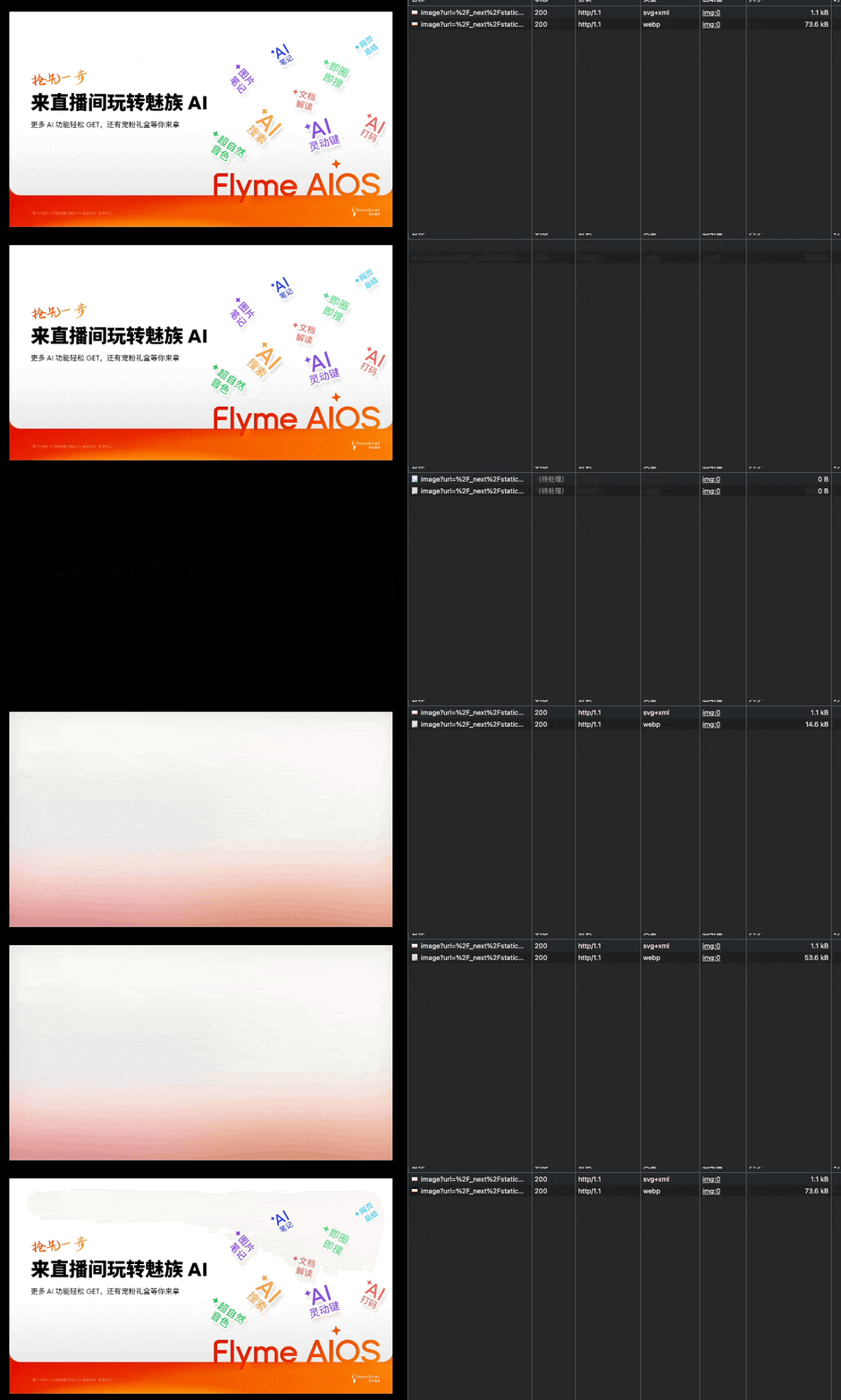
对于动态图片,可以直接提供 base64
placeholder={`data:image/svg+xml;base64,${xxxxx}`}placeholder={`data:image/svg+xml;base64,${xxxxx}`}也可以用 plaiceholder生成 base64
图片 CDN
如果要使用云提供商来优化图像,而不是使用 Next.js 内置的图像优化 API,可以 next.config.js 按照如下方式进行配置 loaderFile(如果需要直接使用图片地址,而不是把图片下载到项目里)
const isProd = process.env. NODE_ENV === 'production'
module.exports = {
reactStrictMode: false,
assetPrefix: isProd ? '/new' : undefined, //cdn前缀 访问静态资源的前缀
basePath: isProd ? '/new' : undefined, // 访问路由的前缀
images: {
loader: isProd ? 'custom' : undefined,
loaderFile: isProd ? './bin/image-loader.js' : undefined,
remotePatterns: [
{
protocol: 'https',
hostname: 'store.res.meizu.com',
port: '',
pathname: '/www/**'
}
]
}
}const isProd = process.env. NODE_ENV === 'production'
module.exports = {
reactStrictMode: false,
assetPrefix: isProd ? '/new' : undefined, //cdn前缀 访问静态资源的前缀
basePath: isProd ? '/new' : undefined, // 访问路由的前缀
images: {
loader: isProd ? 'custom' : undefined,
loaderFile: isProd ? './bin/image-loader.js' : undefined,
remotePatterns: [
{
protocol: 'https',
hostname: 'store.res.meizu.com',
port: '',
pathname: '/www/**'
}
]
}
}bin
'use client'

export default function myImageLoader({ src, width, quality }) {
  return `${src}?w=${width}&q=${quality || 75}`
}
'use client'
export default function myImageLoader({ src, width, quality }) {
return `${src}?w=${width}&q=${quality || 75}`
}